Workshop 01 - OOP
Home →Creating a new C# .Net solution
Install Microsoft Visual Studio Community: MS VS DownloadsChoose: Create New Project\Windows Forms App C#\.NET 8 or .NET 10 and name it UPBDotNet
In Solution Explorer, right click on solution and choose Add\New Project\Class Library C#\.NET 8 or .NET 10 and name it UPBLib
In Solution Explorer, right click on solution and choose Add\New Project\MSTtest Test Project C#\.NET 8 or .NET 10 and name it UPBTest
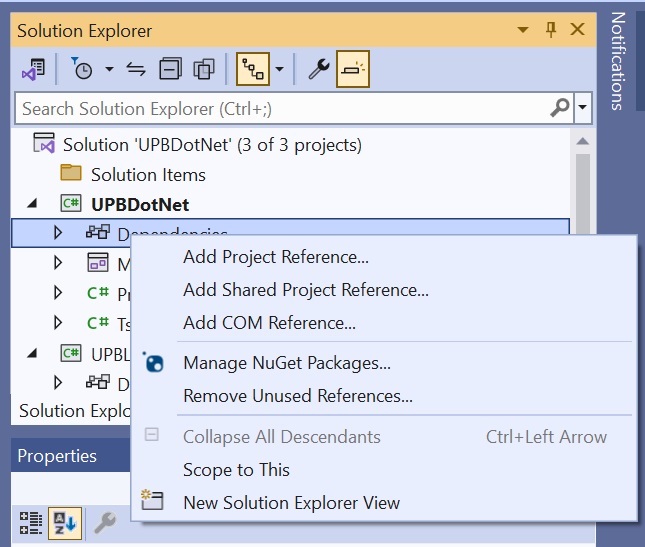
In Solution Explorer, right click on UPBDotNet\Dependencies Select Add Project Reference and check UpbLib
In Solution Explorer, right click on UPBTest\Dependencies Select Add Project Reference and check UpbLib
Creating a Matrix class
In Solution Explorer, right click on the UPBLib project, choose Add\Class, and name it Matrix.csIn Matrix.cs, add a private "_matrix" array variable together with 2 overloaded constructors.
Observation: as opposed to private variables, which are visible only in the current class (not just current instance!), protected variables are also visible in derived classes.
Important! Unlike linked lists, arrays store elements contiguously, allowing fast random access, but making insertions slower because elements need to be shifted.
In agreement with the encapsulation principle, private/protected variables should be accessed through dedicated accessor functions:
Thus, it is possible to provide only the "get" methods in order to implement read-only properties. In C# .Net the syntax is significantly simplified:
Implement an indexer for accessing matrix elements
In .Net C# any class inherits Object by default
Override the ToString() virtual method (for performance reasons, use a StringBuilder class instance for string concatenation):
Important! Multiple inheritance is not allowed in .Net. However, one could implement any number of interfaces. I would name interfaces "pure abstract classes". While abstract classes may contain both functions with implementation and prototypes, interfaces contain only functions/properties definitions. An interface defines "a contract" that classes must conform to.
Implement matrix multiplication by overloading the * operator. An exception is thrown when incorrect arguments are provided.
For implementing a custom exception one could inherit the Exception class:
Test the previously created Matrix class
In UPBDotNet project, open the form designer, select Button from Toolbox, and "draw" a new button on the formSelect the previously created button and, in properties window, change its name to buttonOK
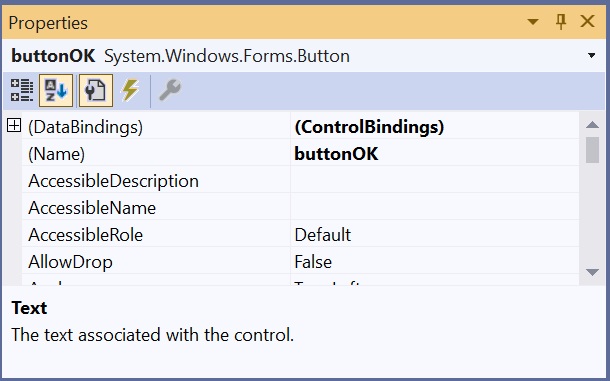
Double click on buttonOK in order to write code for its corresponding click event
Add first the necessary using statement at the top of the cs file (as Matrix is defined in the UPBLib class library project): using UPBLib;
Use try/catch for exception handling
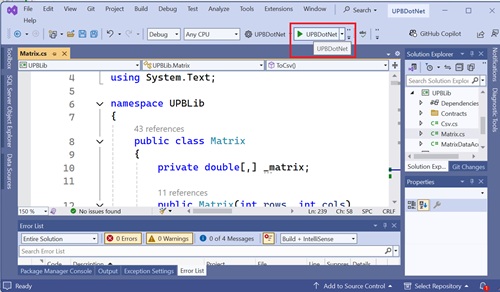
Run the UPBDotNet project
References:
Microsoft C# language documentationHome →